

게임 정보
| 출시일: | 2020년 12월 31일 |
| 개발사: | Mediator Software |
| 퍼블리셔: | Mediator Software |
| 플랫폼: | Windows |
| 출시 가격: | 무료 |
| 장르: | 유틸리티 |

업적 목록
업적 정보가 없습니다.
추천 게임


게임 소개
Use your Samsung GearVR or Oculus Mobile headset as a VR Headset for your PC. Lets you run SteamVR & Oculus Rift PC VR titles using your GearVR/Oculus Mobile headset.
SteamVR
To use the iVRy Driver for SteamVR, you MUST first install SteamVR from the Steam Store.
Before you start
IMPORTANT:
Before using the iVRy Driver for SteamVR, the iVRy GearVR/Oculus app MUST be installed on the Mobile Device. To do so, enable USB Debugging on the device, connect it via a USB cable to the PC and select the "Install GearVR/Oculus Mobile App" Launch option of the iVRy Driver for SteamVR.
To start the app on GearVR, tap the icon in the Android launch screen and insert the device into the GearVR headset when prompted. Device must be mounted in GearVR before starting SteamVR.
To start the app on Oculus Go/Quest/Quest 2/Quest 3, use the link in the "Unknown Sources" section of the "Apps" menu.
On startup the app will display "Waiting for Connection", while it waits for the iVRy Driver for SteamVR to connect. SteamVR can be launched from the iVRy "Launch" button, or by launching SteamVR or a SteamVR/OpenVR VR title.
When using the iVRy Driver for SteamVR for the first time, it MUST be started from the "Launch" button, to ensure any additional services and drivers it requires get installed.
GearVR
IMPORTANT:
If the GearVR device is stuck in an update loop, or if the GearVR system files need to be (re)installed, use the iVRy GearVR System Files Installer DLC.
For GearVR, the "Allow VR API without OSIG" option MUST be enabled in the Gear VR Service "Developer options" on the Mobile Device.
To enable "Developer options" for Samsung Gear VR devices:
- Open Android "Settings"
- Select "Apps"
- Select "Gear VR Service"
- Select "Storage"
- Select "Manage Storage"
- Tap on "VR Service Version" several times
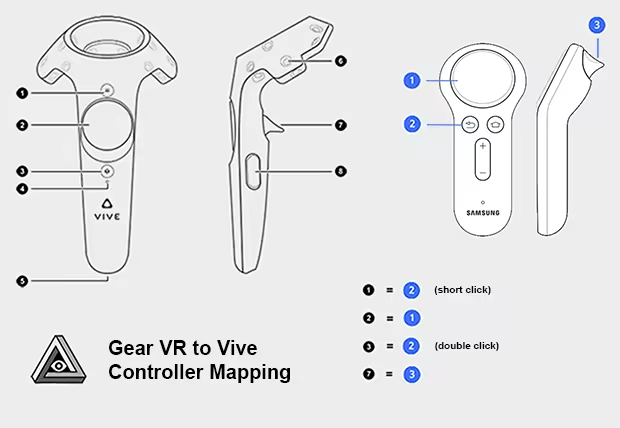
When using the GearVR or Oculus Go version of the iVRy app, with a GearVR/Oculus Go controller, the following button mappings will be used:
게임 정보
What is the iVRy for SteamVR (GearVR/Oculus App Installer) DLC?
• It is the installer for the iVRy app for Samsung GearVR or Oculus Go/Quest/Quest 2 headsets.
What is iVRy (GearVR/Oculus Edition)?
• iVRy is an app for your Samsung GearVR or Oculus Go/Quest/Quest 2 headset with a Virtual Reality headset driver for SteamVR.
What does that mean?
• Want to play PC VR* (Virtual Reality) titles without having to buy another VR headset?
• With iVRy and a Samsung GearVR or Oculus Go/Quest/Quest 2 headset you can!
• Supports Wired (USB) connections for greater visual quality and performance.
• Supports Wireless (Wifi) connections for greater mobility.
• Automatically adjusts quality to maintain optimal frame rates on all connection types.
• User configurable quality and performance options.
• Integrates with SteamVR, so no 'manager' / 'server' apps or additional configuration required.
• Includes SteamVR Dashboard overlay, to change driver settings in VR.
• Built-in support for NoloVR 6DOF tracking and motion controllers.
• Compatible with most HTC Vive and Oculus Rift** titles.
• "Lite" edition has all of the features of "Premium" edition, but will start to reduce color saturation after being connected for more than 5 minutes. Upgrade to "Premium" edition via Steam DLC to remove this limitation.
* Valve OpenVR/SteamVR. Requires Valve Steam & SteamVR on Windows 7 or later.
** Oculus Rift titles require Valve SteamVR, Oculus Home & 3rd party 'LibreVR Revive' software.
스크린샷



접속자 수
가격 정보
업적 목록
업적 정보가 없습니다.
요약 정보
스팀 리뷰
스팀 리뷰가 존재하지 않습니다.