

Punch! ViaCAD 2D/3D v9 - Tips, Tutorials, and Techniques eBook
Evolution Software
2016년 8월 4일
45
조회수
0
리뷰 수
0+
추정 판매량
N/A
긍정 평가
게임 정보
| 출시일: | 2016년 8월 4일 |
| 개발사: | Evolution Software |
| 퍼블리셔: | PunchCAD,Encore Software |
| 플랫폼: | Windows, Mac |
| 출시 가격: | 27,000 원 |
| 장르: | 애니메이션과 모델링, 디자인과 일러스트레이션 |

업적 목록
업적 정보가 없습니다.
추천 게임



게임 소개
Do more with ViaCAD. The new Tips, Tutorials and Techniques eBook guides the way with 280 useful tips for new users and seasoned pros alike.
상세 설명
New! ViaCAD Tips, Tutorials and Techniques eBook
Master ViaCAD with 280 Useful Tips
Do your best work, use ViaCAD in the best way possible. The New ViaCAD Tips, Tutorials and Techniques eBook guides the way to success.
Better Drafting and Design
Punch!CAD expert, CAD developer and engineer, Timothy D. Olson shows how to do more in less time with 280 fully-illustrated tips. Discover insights for everything from beginning to advanced applications.
Handy Tips for Beginners and Advanced Users
With ViaCAD's friendly user interface, even brand new users can launch and begin designing immediately. Even pro users can increase their proficiency. Find handy tips, tutorials, and technical notes for the entire ViaCAD family of consumer CAD products:
Easy-to-understand tips give you a new awareness of ViaCAD -- no technical manual required! Tutorials walk you through processes with easy to follow steps.
Master ViaCAD with 280 Useful Tips
Do your best work, use ViaCAD in the best way possible. The New ViaCAD Tips, Tutorials and Techniques eBook guides the way to success.
Better Drafting and Design
Punch!CAD expert, CAD developer and engineer, Timothy D. Olson shows how to do more in less time with 280 fully-illustrated tips. Discover insights for everything from beginning to advanced applications.
Handy Tips for Beginners and Advanced Users
With ViaCAD's friendly user interface, even brand new users can launch and begin designing immediately. Even pro users can increase their proficiency. Find handy tips, tutorials, and technical notes for the entire ViaCAD family of consumer CAD products:
- ViaCAD 2D
- ViaCAD 2D/3D
- ViaCAD Pro
- Plus helpful tips for Shark users
Easy-to-understand tips give you a new awareness of ViaCAD -- no technical manual required! Tutorials walk you through processes with easy to follow steps.
- User Interface: Learn how to use the start-up screen, the Gripper, work planes, snaps, tool palettes, preferences, layers and concept explorer. Also, manage performance, select objects and modify objects. PLUS - Top 10 tips for new users.
- Drafting: Master a collection of essential tools used to create and manipulate 2D objects, including curves, text and annotations. Add symbols, apply BOMs and draw views.
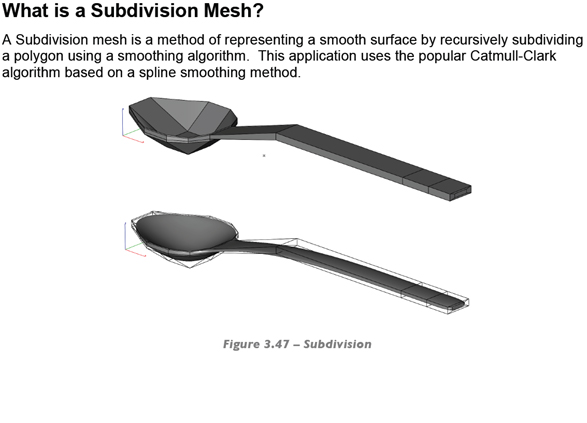
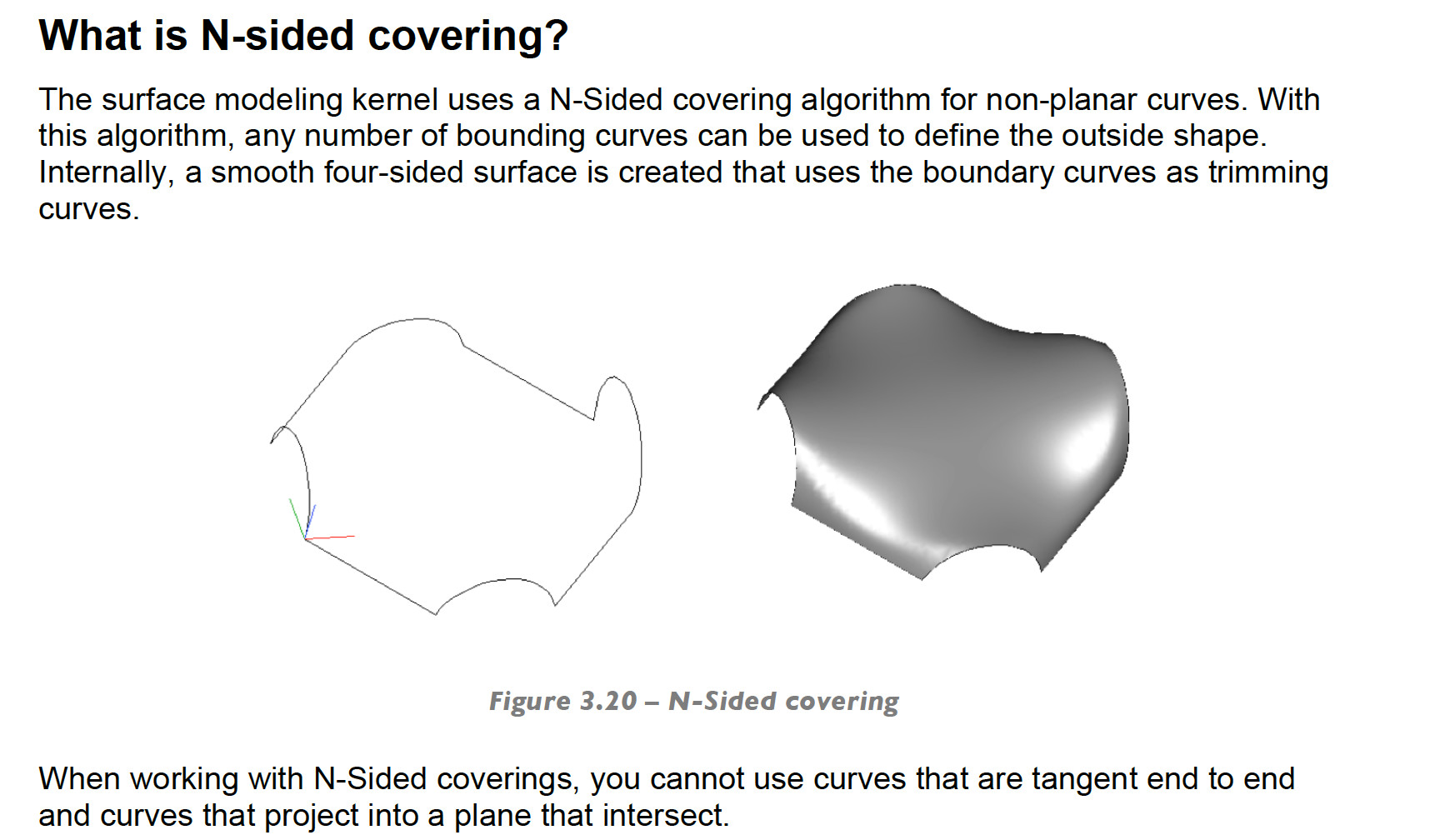
- Surface Modeling: Use surface construction utility tools for skinning and lofting, covering, nets, and sweeps. Apply surface utility tools to cut, intersect, project, trim or rebuild surfaces.
- Solid Modeling: Build objects that are closed bodies with well-defined mass properties. Make primitives for truncated cones and elliptical cylinders, and access primitive control points. Control gaps, overlaps and more.
- Rendering and Display: Create and manipulate CAD shapes for curves and surfaces. Define resolution angles and defaults. Explore options for viewing data.
- Photo Realistic Rendering: Generate an image from a scene that contains CAD shapes combined with texture, lighting and shading information. Use photo-rendering to produce impressive visual realism. Adjust angles to applied materials.
- Data Sharing: Share your designs with other applications in a variety of data formats, including surface and solid model, and facet based. Explore exporting options, extensions and other data sharing methods.
스크린샷




접속자 수
가격 정보
업적 목록
업적 정보가 없습니다.
요약 정보
스팀 리뷰
스팀 리뷰가 존재하지 않습니다.